Pay Instruction Data
Overview
The milliPay API uses the JSON Web Token [JWT] as encoding for the pay instruction data. The JWT is a signed and URL safe encoded data block, which can be split by the dot into the header.data.signature parts. In the data part - the claims - milliPay expects an attribute payload with a dictionary containing the payment specification. The JWT is signed with a secret key you receive during the merchant sign up.
Check this link to see a template for the pay instruction decoded or the Example JSON Web Token at the end.
We advise you to use one of the libraries found on the official jwt.io website to generate, parse and verify JWTs. Background information on JWTs can be found on the introduction section of the official site.
payload
The following attributes of the payload dictionary are mandatory. But you can add more attributes of your choice for specific integration purposes. These data is going back and forth during a payment processing.
| Name | Type | Min. | Max. | Unit |
|---|---|---|---|---|
| title | String | 0 | 255 | n.a. |
| price | float | 0.001 | 30.000 | currency |
| currency | String | 2 | 3 | ISO XXX |
| validity | int | 0 | 3628800 | seconds |
| productId | String | 0 | 255 | n.a. |
| productUrl | String | 7 | 1024 | URL |
| vendorId | String | 3 | 255 | n.a. |
| vendorname | String | 1 | 255 | n.a. |
| vendorlogourl | String | 7 | 1024 | URL |
Note
Your additional data is not persisted along with the transaction.
title
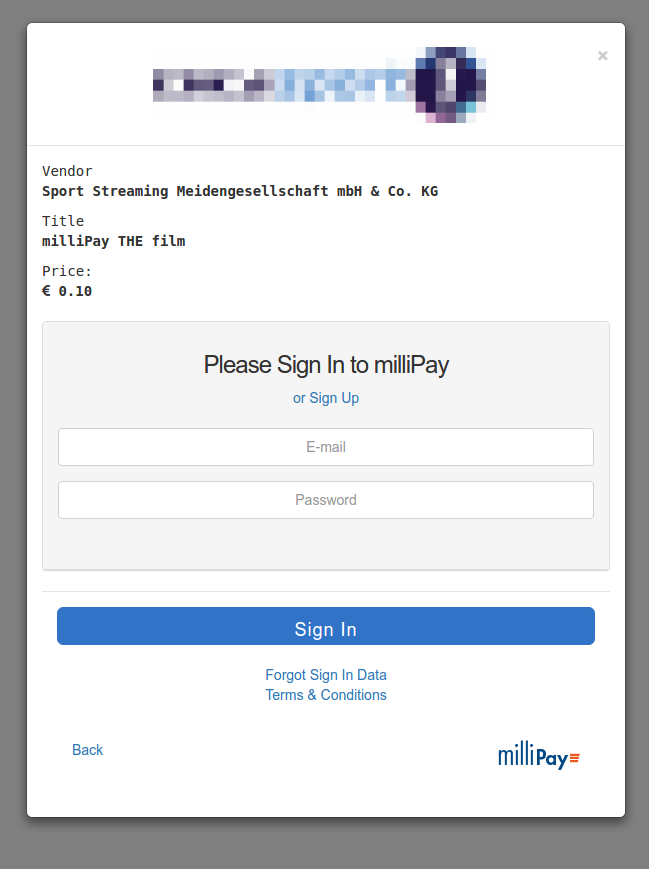
The title of the item in transaction. It appears in the account statement of the customer, and the report of the merchant. It also appears in the sign in, sign up, top up workflows on the milliPay website.
price
The price of the item in transaction. It is in the currency of the vendor. A currency exchange rate may be applied during the payment transaction, if the consumers account currency is different. It also appears in the sign in, sign up and top up workflows on the milliPay website.
currency
The vendor currency of the transaction applied to the price. It also appears in the sign in, sign up, top up workflows on the milliPay website.
validity
Defines how long the item is reaccessable for the consumer without paying again. The time is in seconds and stored along with the transaction. It is part of the entitlement management.
productId
Identifies the item in transaction, it is stored along with the transaction. It is part of the entitlement management. It is the only element to identify two items being the same, the product url or title is not taken into account.
productUrl
The productUrl is used in the online account statement to make the title clickable. The productUrl should be chosen wisely, so that the consumer can reaccess the paid content again. The productUrl of the item in transaction must not match the browsers active document URL at the transaction time.
The productUrl is also part of the merchant report.
vendorId
The identifier of the merchant you get during the sign up process. It is used to route the payments to your account.
vendorname
The name which appears in the sign in, sign up, top up workflows on the milliPay.
vendorlogourl
The URL pointing to your merchant logo. It appears in the sign in, sign up, top up workflows on the milliPay. The logo is centered and responsive included.
Example JSON Web Token
The JWT
eyJ0eXAiOiJKV1QiLCJhbGciOiJIUzI1NiJ9.
eyJwYXlsb2FkIjp7InRpdGxlIjoiZ2l2ZS1pdC1hLXRpdGxlLW1heWJl
LXRoZS12YWx1ZS1vZi1hLWgxLXRhZz8iLCJwcmljZSI6IjAuMTAiLCJj
dXJyZW5jeSI6IkVVUiIsInZhbGlkaXR5IjoiMzAiLCJwcm9kdWN0SWQi
OiJ5b3VyLWlkZW50aWZpZXItZm9yLXRoZS1jb250ZW50IiwicHJvZHVj
dFVybCI6Imh0dHA6Ly95b3VyLmRvbWFpbi50bGQvcGFnZWlkIiwidmVu
ZG9ySWQiOiJJTVBPUlRBTlQtcHV0LWhlcmUteW91ci1tZXJjaGFudC1p
ZCIsInZlbmRvcm5hbWUiOiJBQ01FIE5ldyBCdXNpbmVzcyAmIFZhbHVl
IEx0ZC4iLCJ2ZW5kb3Jsb2dvdXJsIjoiaHR0cDovL3lvdXIuZG9tYWlu
LnRsZC9sb2dvMTEweDgwLnBuZyJ9fQ.
tuwwkclPTReRjWegplDQV7x06r2Bn-sLORqdJOew6iY
contains the millipay payload in the data part:
1 2 3 4 5 6 7 8 9 10 11 12 13 | {
"payload": {
"title": "give-it-a-title-maybe-the-value-of-a-h1-tag?",
"price": "0.10",
"currency": "EUR",
"validity": "30",
"productId": "your-identifier-for-the-content",
"productUrl": "http://your.domain.tld/pageid",
"vendorId": "IMPORTANT-put-here-your-merchant-id",
"vendorname": "ACME New Business & Value Ltd.",
"vendorlogourl": "http://your.domain.tld/logo110x80.png"
}
}
|